Case Study · Carelon / Elevance Health · Healthcare · Nov 2025 — Feb 2026
Auditor Workbench
Reimagining Claims Auditing with Intelligent Guidance
A modernized, AI-assisted claims auditing platform that replaces fragmented, manual workflows with a guided, step-by-step "guided audit" experience powered by Auditor Bots — driving consistency, accuracy, compliance and faster turnaround.
Role
UX Lead Designer
Duration
Nov 2025 — Feb 2026
Domain
Payer · Claims · HIPAA
Team
Surya Teja (Lead) · Venkatesh (Sr UX) · Rishobh (UX)
Overview
The product
The Auditor Workbench modernizes the manual claims auditing process by introducing a streamlined, automated workflow. Through a user-friendly interface and the support of Auditor Bots, auditors are guided step-by-step via a smart, "guided audit" experience.
Auditor Bots automatically extract relevant claim data and assist in completing a standardized 13-step checklist, reducing manual effort and ensuring consistency, accuracy and compliance.
The solution enhances audit efficiency, minimizes errors and shortens turnaround times — ultimately driving better productivity and supporting data-driven decision making in claims management.
My Role
As UX Lead Designer, I partnered with stakeholders to define product scope and shape design deliverables, while driving end-to-end execution — from research and concept development through to final design and developer handoff — ensuring alignment with user needs, business goals and technical feasibility.
Phase 01
Discover — Problem, Users & Business
The problem
The process was highly manual, time-consuming and inefficient. Auditors reviewed multiple documents across outdated, non-intuitive applications. The fragmented workflow led to slower audits and increased oversight and human error.
There was no centralized, user-friendly system, which:
- Hindered productivity
- Reduced audit accuracy
- Caused inconsistency in following audit checklists
A critical need to modernize the process across:
- Efficiency
- Accuracy
- Overall user experience
Audit checklist (legacy)
All auditors follow a 13-step checklist, which existed as a web form. Every auditor manually tracked checklist progress and uploaded the form with each audit — slow, error-prone and impossible to standardize at scale.
Targeted users
Primary
Auditors (SMEs)
Day-to-day claim auditing using the 13-step checklist.
Secondary
Audit Managers
Workload allocation, oversight, weekly status, audit review.
Tertiary
Directors & above
Program-level visibility, KPIs, trends and reporting.
Business challenges
Research — auditing process & users
To gain a comprehensive understanding of the current auditing process, we ran multiple focus groups and workshops with the auditing team. Auditors walked us through their day-to-day work and detailed every step of the audit workflow — including every application they used — letting us capture the end-to-end process with clarity and accuracy.
We also engaged managers and leadership to understand their oversight responsibilities. Managers were using a separate dashboard application to track audit progress, manage workload and provide a holistic view to leadership — surfacing a clear opportunity to unify the experience.
Phase 02
Define — Personas, Features & Flows
User personas
We identified the user personas who would interact with the new application and analyzed the specific tasks each would perform — then collaborated with the Auditor Bots product team to explore features and ran idea-generation and brainstorming sessions to shape the highest-value capabilities.
Persona · Primary
Auditor
As a Claims Auditor, my goal is to make sure all claims are handled correctly and quickly, following the rules and regulations that are set. I carefully check and study the data in the claims, confirm the information is accurate, and find any mistakes or actions that require further inquiry.
Persona · Secondary
SuperUser / Manager
As a manager my job is to optimize workflow, enhance resource allocation and ensure timely claims processing — emphasizing continuous improvement based on performance metrics. I want a program-level overview of auditing work and the ability to generate reports from the data.
User needs
Unique features
Error flagging
Highlights data mismatches in-line, in context.
Configurable checklists
Audit steps and error categories tunable per program.
Unique insights
Trends and patterns surfaced from processed audit data.
Eisenhower matrix — prioritization
Important · Urgent
- Guided audit checklist integration
- Automated claim data extraction via Auditor Bots
- Audit trail & history logging
- Centralized UI for auditors
- Role-based dashboards for managers / superusers
Important · Not Urgent
- Analytics and reporting for audit trends and performance
- Integration with legacy and third-party systems
Not Important · Urgent
- Help documentation for onboarding
- Data entry field validations
- Notification setup for reminders and tracking
- Routine QA testing
Not Important · Not Urgent
- Support for niche claim types or rare workflows
- Overly detailed animation or visual effects
- Multilingual support
Phase 03
Design — Lo-Fi to Hi-Fi
Task flows
With a clear understanding of user needs we mapped the new, improved workflow. Using Miro we sketched early concepts and visualized the experience collaboratively.
Around the same time the product team delivered an enhanced version of the audit checklist designed to work seamlessly with the Auditor Bots — bringing more structure and intelligence to the process. After several layout iterations we had a clear direction for the screen architecture.
Site map & lo-fi wireframes
We created the site map for the application. With these flows in place, we transitioned into designing low-fidelity wireframes to validate structure, navigation and information density before investing in high-fidelity visual design.
Final product
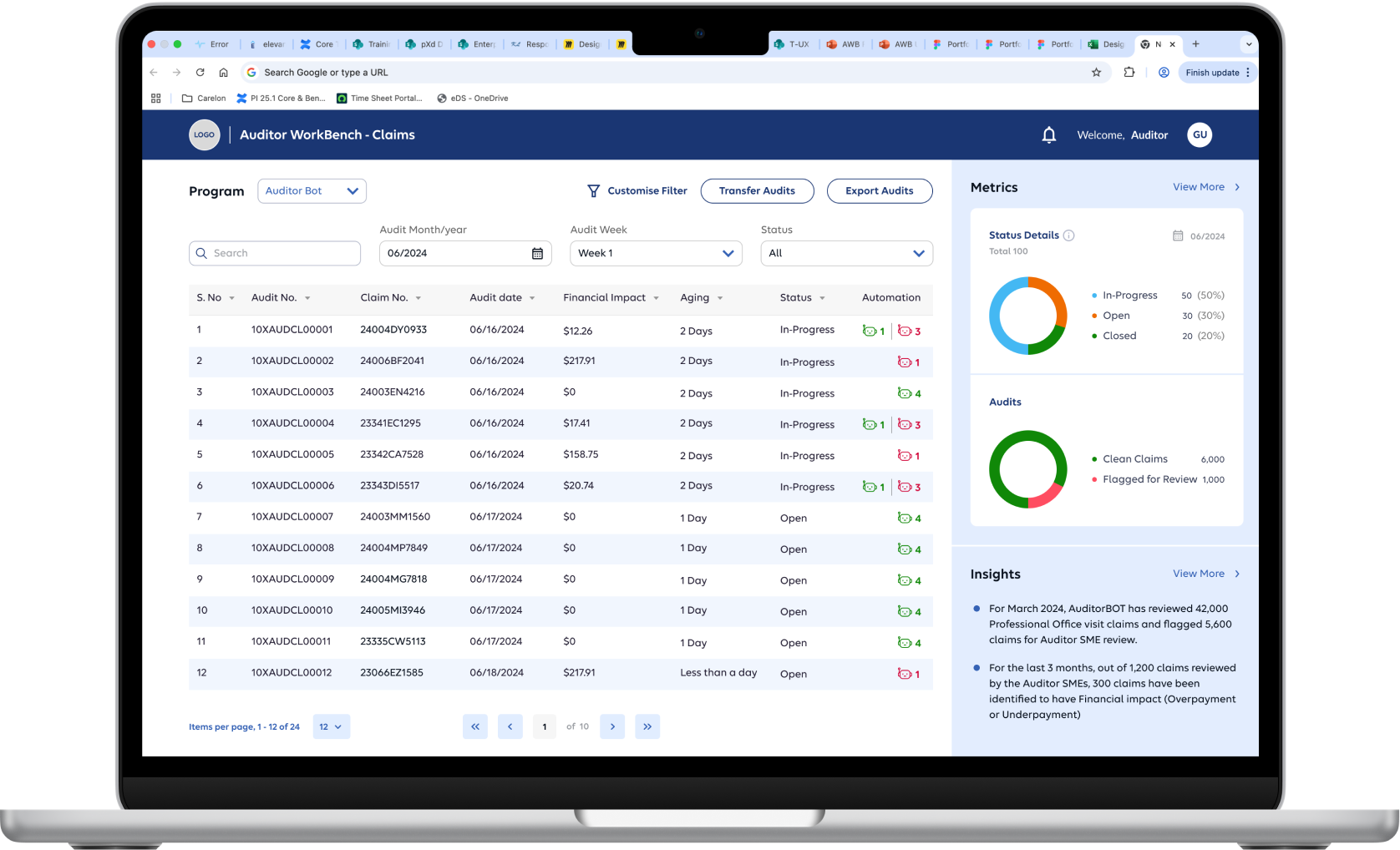
Auditor Dashboard
Lets users view their assigned audits and status at a glance, and seamlessly transfer and export audits.
Audit Checklist
A clear, step-by-step guided audit with bot-assist for faster workflow — the user makes the final decision. Supporting evidence behind the bot's reasoning is shown for better understanding. The application pulls data from different sources into one place, and users can add notes and supporting documents. Previously auditors manually tracked progress and opened multiple apps to verify data; now everything lives in one centralized system.
Manager Dashboard
Managers previously used a separate dashboard for audit metrics — we integrated it into the manager view. Weekly audit status and progress, individual auditor workload and review of audits all happen from the same platform. Includes Overview, Summary and Detailed views.
Audit Checklist — error categories
Users can add relevant error categories and financial impact as they move through the checklist.
Audit Review Screen
A consolidated review surface for sign-off — every checklist item, bot recommendation, evidence, notes and the auditor's final decision in one place.
Prototype
We built a robust prototype with 3 different data sets and detailed interactions to show the business how the actual product will work and to gather user feedback on flows and screens.
Phase 04
Conclusion — Outcomes & Learnings
End-to-end
Audits completed in one app
Centralized
All data in one workbench
Guided
Step-by-step 13-point checklist
Bot-assisted
Auditor decides, bot supports
With a successful handoff, the Auditor Workbench received high praise for timely completion and the workflow improvements that now let users audit faster and more accurately. Most of the data is now centralized and users can complete an end-to-end audit inside the application. Initial feedback from Auditors and Leadership was promising and continued to be positive.
The project was a rewarding opportunity to rethink and redesign a traditionally manual, fragmented process through the lens of intelligent automation. Collaborating closely with cross-functional teams — product, engineering and auditors — we brought structure, clarity and innovation to claims auditing.
By integrating AI-driven Auditor Bots, a guided checklist and a streamlined UI, we created a solution that enhances accuracy and efficiency and empowers auditors to focus on what matters most: making informed, consistent decisions.
This project reinforced my belief in the power of user-centered design — especially paired with emerging technologies — and deepened my experience in building scalable enterprise systems. Even complex, regulated domains like healthcare auditing benefit greatly from thoughtful design and cross-disciplinary collaboration.